

For most mobility and admin teams, Mondays don't start with mobility strategy. They begin with checking spreadsheets, opening vendor portals, and responding to emails about entries that don't look correct.
Mileage needs adjustments, or an expense doesn't match policy. A request sits in someone's inbox because the context lives somewhere else. None of these issues is complicated, but together, they quietly consume many hours every week.
This is the reality of corporate mobility management in many organisations today. Mobility data lives across various tools, vendors, and teams. Manual work holds everything together.
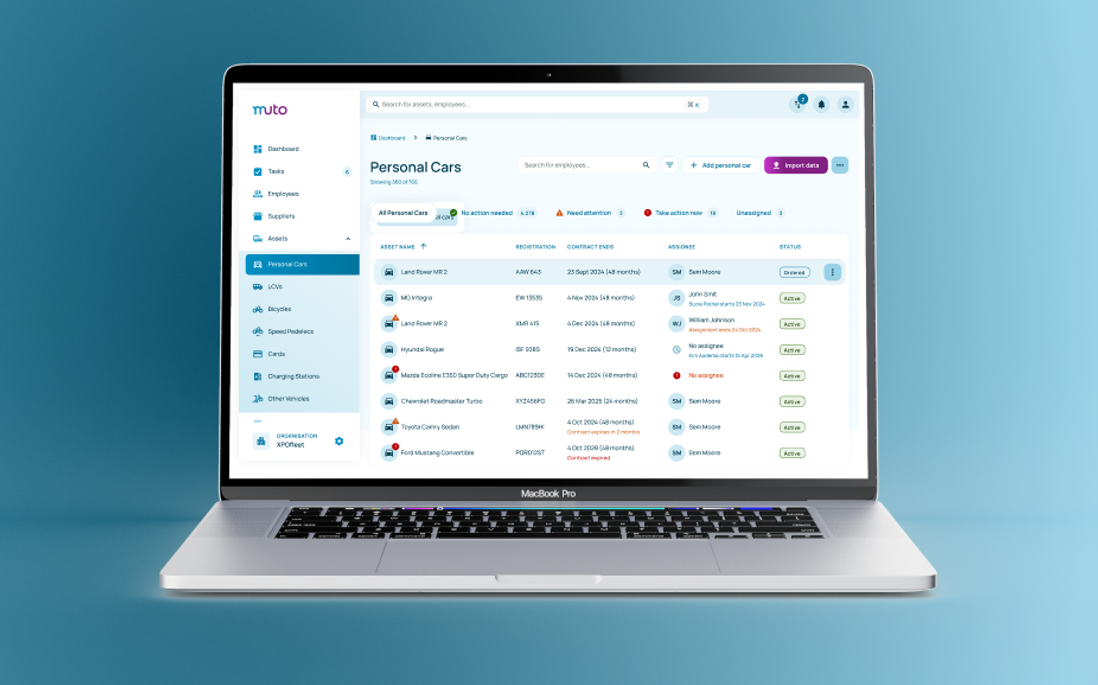
Reducing this workload doesn't require a large transformation project. You can already automate mobility tasks today. The first and most critical step is to bring all mobility data into a single operational view.
In practice, this often takes the shape of a central mobility system. Or, a platform that connects existing tools and vendors into one operational view. The key is not to replace everything, but to create a single place where teams can consolidate, validate, and reuse mobility data.
In this article, we take you through six practical mobility tasks you can tackle step by step. Some reduce manual work immediately. Others become possible once data and rules are in place. Together, they show how mobility management automation works in practice.
Task #1 Centralise your mobility data #
Before you can automate anything, you need one place where mobility data comes together.
In many organisations, mobility information lives across mileage tools, vendor portals, expense systems, spreadsheets, and inboxes. When someone needs an answer about usage, cost, or policy compliance, the search for the correct information begins. This often means reconciling and cross-checking data manually, which creates significant administrative work.
Centralising mobility data means creating a single operational view of mobility, rather than managing it across disconnected tools.
Importantly, this does not require replacing every vendor or changing how employees travel. It means bringing key mobility data into a single place. Connect existing mileage tools, expense systems, HR data, and vendor feeds into a single operational view.
When mobility data is centralised:
- Usage, costs, and policies become visible in one view
- Teams stop searching across fragmented tools and emails
- Teams work with live mobility data instead of piecing it together after the fact
Even without automated rules or workflows, centralising data already removes much of the daily admin work. It eliminates manual searches, duplicate reporting and reconciliation.
Most importantly, centralising mobility data creates the foundation for everything that follows. Once teams work from the same data, automation stops being abstract and starts becoming practical.
Task #2 Validate mileage and commute data at the source #
Mileage and commute registrations are among the most common sources of ongoing mobility administration. Teams especially struggle with the quality of the data they receive.
Employees manually enter trips or commute data, often using estimates or inconsistent formats. Admin teams then verify distances, check that routes are eligible, and confirm policy limits. Errors only emerge later. This leads to corrections, re-submissions, and follow-up emails that become part of the daily routine.
In this setup, teams spend their time correcting data instead of managing mobility.
How automation changes the flow #
Once mileage data is captured in one place, the system validates mileage and commute data as employees submit it, not afterwards.
For instance, when employees register trips in one place, the system automatically calculates distances. It applies policy rules immediately, validates routes, and limits, blocks or flags anything that doesn't comply. Invalid submissions never reach admin or finance.
This is how automation works in practice: the system enforces rules before submission, not through manual checks afterwards.
As a result, several time-consuming tasks disappear:
- Correcting mileage entries after submission
- Explaining policy rules after entries are already submitted
- Chasing employees for missing or invalid data
Mileage registration shifts from a heavy admin task to a background process, producing clean, validated data from the start.
Task #3 Automate mobility expense reimbursements #
Mobility reimbursements are often where mobility administration becomes visible to everyone. This is especially the case when payments are delayed, corrected, or questioned.
Employees submit expenses late or with missing context. Finance teams then pause the process to verify amounts, check eligibility, and confirm policy compliance. The reimbursement itself isn't the problem; it's the manual validation around it that creates delays and uncertainty.
How automation changes the flow #
Automation shifts reimbursements from manual checks to pre-validated mobility data that finance teams can trust.
Expenses link directly to recorded mobility usage, such as mileage, commute registrations, and assigned mobility benefits. The system checks eligibility and policy limits before submission.
Instead of verifying data after the fact, finance receives information that the system has already checked against mobility rules. Reimbursements move forward without intervention, and finance steps in only when a real exception appears.
Approved reimbursements then flow automatically to payroll or direct payout, without manual handovers or follow-up checks.
As a result:
- Reimbursements move faster and more predictably
- Payroll corrections become less frequent
- Finance spends less time on routine checks
Expense reimbursements stop being a monthly friction point and become a controlled, largely automated process.
Task #4 Apply mobility policies automatically #
Mobility approvals are meant to provide control, but in many organisations, they end up creating friction instead.
Managers approve mobility requests manually, often with limited context. Decisions vary from person to person, and similar requests don't always receive the same outcome. When something goes against policy, HR or finance usually learns about it later and needs to step in to fix it.
Approvals are often used to compensate for inconsistent mobility policy enforcement across tools and teams.
How automation changes the flow #
Policy enforcement transitions from inbox management to rule-based automation.
Teams define eligibility rules, budget and usage limits once. The system then automatically applies those rules to every mobility request in real time.
Requests that comply with policy move forward immediately, while the system blocks or flags non-compliant requests before they create follow-up work.
The results are evident:
- Policies are applied consistently across all mobility benefits
- Routine approval queues disappear
- Exceptions become visible instead of slipping through
Teams no longer rely on manual approvals to maintain control. Instead, the system enforces policies exactly as defined.

Task #5 Align mobility access with the employee lifecycle #
Mobility onboarding and offboarding involve more manual work than teams expect. That is mainly because they depend on timely coordination between HR, mobility and finance.
When a new employee joins, access will be granted to the right mobility options. When someone leaves or changes roles, teams need to reverse these steps, and often under time pressure.
In reality, offboarding rarely happens exactly at the right moment. Access stays active longer than it should, and mobility benefits remain available after an employee has left. Often, teams need to chase updates across systems to stay compliant.
How automation changes the flow #
Mobility access aligns directly with employee lifecycle data instead of relying on manual handovers.
The mobility system responds automatically to employee status changes. When someone joins, the system grants access to the right mobility options. When a role changes, the benefits and limits update. When someone leaves, it removes access immediately.
The system handles these changes without manual intervention.
What this changes in practice:
- Onboarding happens faster and more consistently
- Offboarding no longer depends on follow-up emails
- Teams reduce the risk of access remaining active or mobility benefits being misused
Mobility onboarding and offboarding stop being coordination-heavy processes. Instead, they become lifecycle flows.
Task #6 Track mobility budgets in real time #
Mobility budgets may feel predictable on paper, but they are much harder to control in practice.
Teams track spending manually in spreadsheets and build reports after the fact. Data arrives late, and by the time reports are ready, overspending has already happened.
In this setup, budget tracking becomes reactive. Teams look backwards instead of managing mobility costs as they evolve.
How automation changes the flow #
Budget tracking shifts from after-the-fact reporting to real-time visibility.
The system records every trip, benefit, and reimbursement as it happens. It tracks budgets in real time, shows committed versus actual spend, and alerts teams when spending approaches the set limits. Reports generate automatically using the same validated data that powers daily operations.
This enables:
- Teams see mobility spend as it happens, not weeks later
- Budget overruns become visible early
- Finance works with up-to-date, reliable numbers
Budget tracking and reporting shift from spreadsheet work to continuous financial control.

Conclusion #
Across all six tasks, the pattern is the same. Most manual mobility admin work doesn't exist because mobility is complex. It exists because teams spend their time searching for information, validating data, and juggling handovers across disconnected systems and data.
Centralising mobility is the turning point. You can take this step right away, using the tools and vendors you already have. You don't need to wait for a complete system change.
Once teams work from the same operational view, many gaps and the need for manual work disappear. Validation happens earlier. Rules apply consistently. Data flows to the right teams without manual intervention.
Automation follows naturally, and not as a transformation project, but as a series of practical improvements.
The real shift is about freeing mobility teams from coordination work so they can focus on what actually matters. They regain more time to shape mobility strategies, support employees, and keep costs and policies under control.
When mobility lives in one place, most daily admin work simply doesn't need to exist.


